I typically configure @playwrightweb to run end-to-end (E2E) and mocked...
I typically configure @playwrightweb to run end-to-end (E2E) and mocked tests separately.
Here’s how:
1. Put e2e and mocked tests in separate folders.
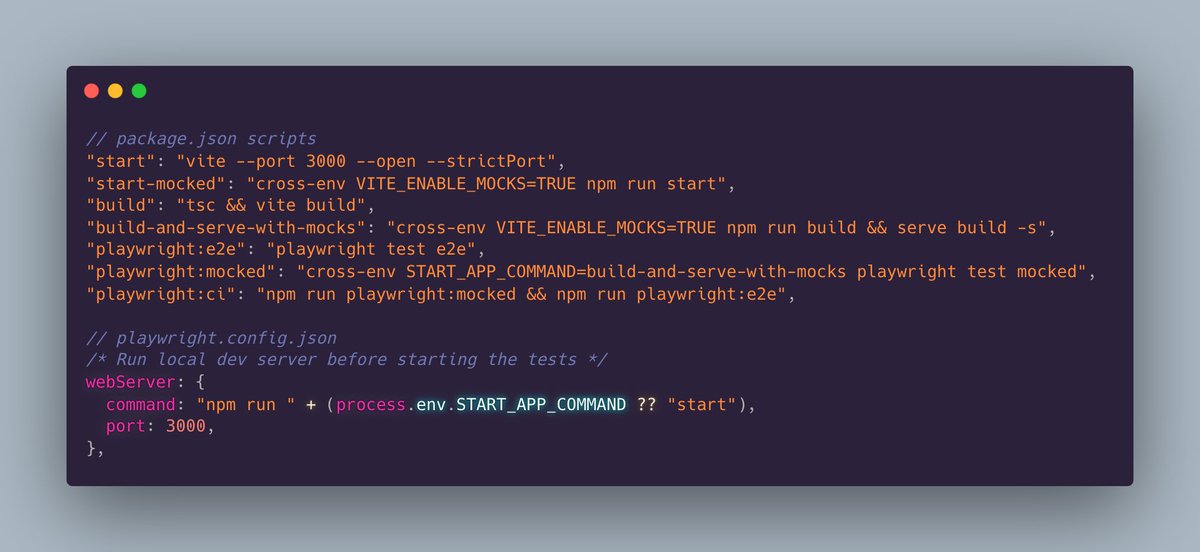
2. Create two separate npm scripts. First, `playwright:e2e` which starts the app and runs tests in the e2e folder. Second, `playwright:mocked` which runs the prod build (so tests run fast), runs tests in the mocked folder, and starts Mock Service Worker (@ApiMocking) to mock all our endpoints.
3. Configure Playwright’s webserver command to read an env var so Playwright can start the app with or without mocks. The env var is set in the npm scripts mentioned in step 2.
Result: E2E tests assure each page loads successfully and shows basic expected content like the header and page title. Mocked tests assure every feature works as expected against mock data. 🔥
Here's the relevant code:
@playwrightweb Problem: What if I want to configure Playwright to use different mock responses for a specific test?
Solution: playwright-msw
https://www.npmjs.com/package/playwright-msw