Problem: Fetching in useEffect means React components render, then fetch
Problem: Fetching in useEffect means React components render, then fetch. This can lead to slow network waterfalls.
Solution: Fetch as you render. Use react-query's prefetching (prefetch in the parent) or use @remix_run which does this by default via nested routes.
#react
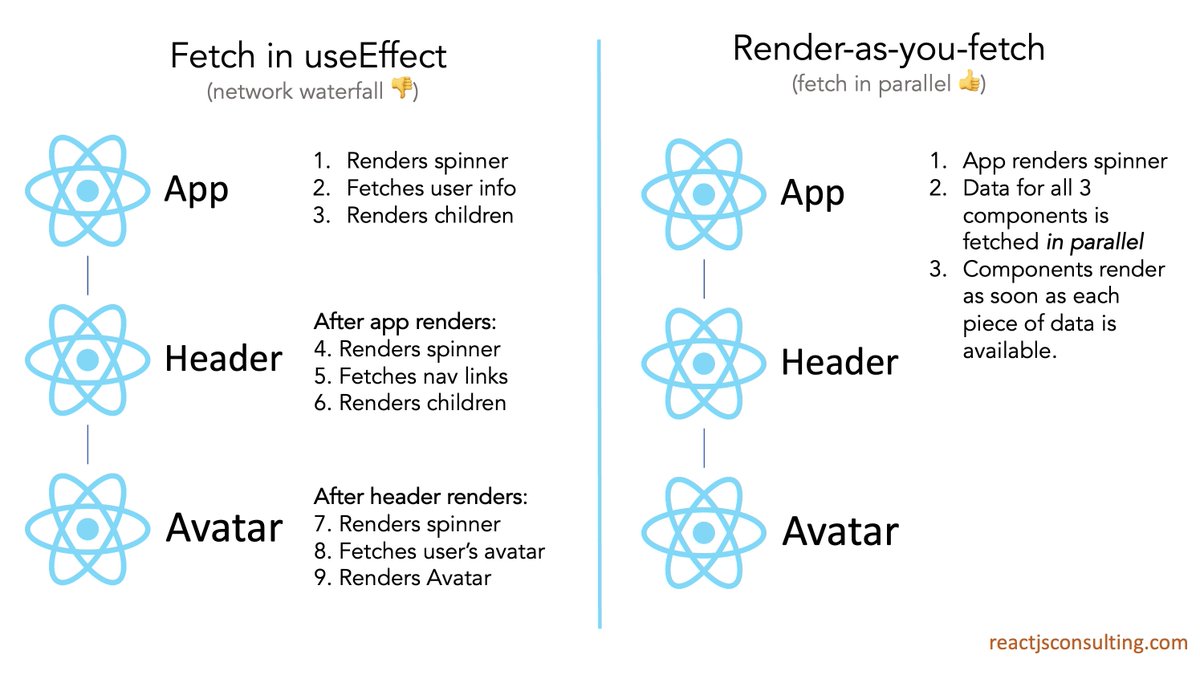
@remix_run *Typo in my tweet: Instead of "Fetch as you render" I should have said "Render as you fetch" (as shown in the image)
Some have asked if there's a way to avoid "fetch waterfalls" with plain React.
Yes, you can. Here's how:
1. Stop fetching in each component. Instead, "lift" fetch calls to a parent so they can be handled in parallel (via promise.all).
2. Then, pass the data down via props.
So, using the initial tweet's example, I could fetch the data for App, Header, and Avatar in parallel in the App component (again, via promise.all in useEffect), and pass the data down via props.
This post spread wide enough that some devs are blaming React itself.
But, network waterfalls can occur in any component library (Angular, Vue, etc). If each component fetches, it creates a network waterfall.
A simple, universal solution: Fetch in parallel, via promise.all.