Problem: With controlled React forms, every keystroke causes the form to...
Problem: With controlled React forms, every keystroke causes the form to re-render. This can lead to lag on long/expensive forms.
Three solutions:
1. Split the form into separate pages
2. Memoize expensive fields via React.memo
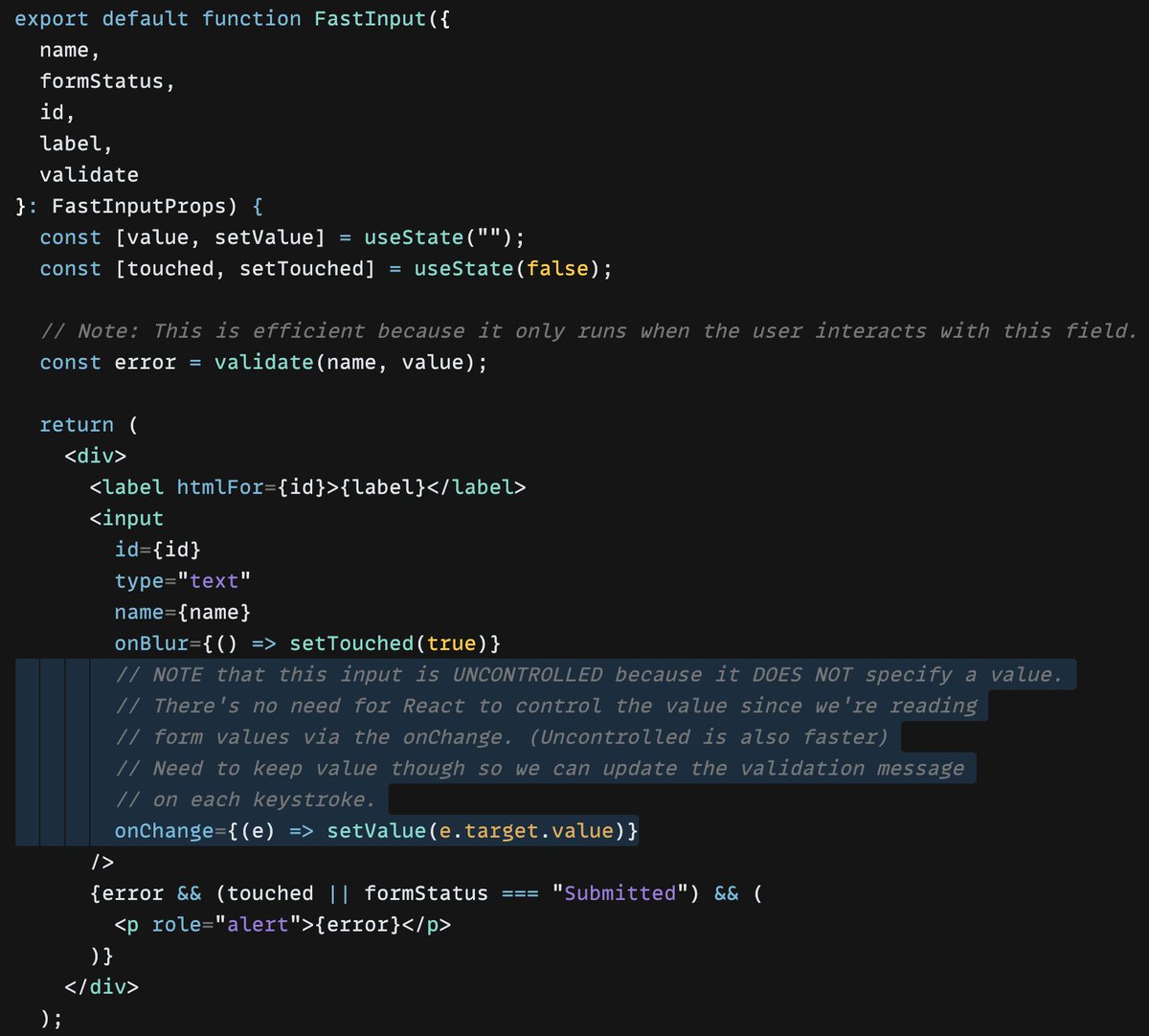
3. Handle field state on each input
🧵 👇
#react
Moving state down to each input means only one input re-renders on each keystroke. 👍
Here’s a demo of a "fast form" that moves field state down to each input:
https://codesandbox.io/s/fast-react-form-with-internal-field-state-xd3dcn?file=/src/App.tsx
This approach is inspired by https://epicreact.dev/improve-the-performance-of-your-react-forms/ by @kentcdodds.
My approach differs in many ways, primarily to provide more granular control and customization.
In the demo, notice that the form's field doesn't have a value assigned, even though the value is in state. So, the input is uncontrolled. But, the field's value is still stored in state (via onChange) so that it's available to check for validation errors.
Oh, and I should clarify: I am NOT proposing using this pattern often. I've found React form performance issues are rare. Traditional controlled forms typically work great. 👍
This tweet is about how I handle form performance issues in the *very rare* instances when they occur.